

Fujitsu
Fujitsu Image Scanner ScanSnap SV600 (FJS-SV600)
Free Shipping
0 review
ปกติ฿25,190
฿21,900SAVE ฿3,290
Out of stock
Warranty information
สินค้าของแท้ 100% จากตัวแทนจำหน่ายอย่างเป็นทางการ รับประกันศูนย์ไทย หากสินค้ามีปัญหาสามารถเปลี่ยนใหม่ได้ทันทีตามเงื่อนไขที่บริษัทกำหนด
warranty1 Year / Carry-In
Product detail
Fujitsu Image Scanner ScanSnap SV600 (FJS-SV600)
Features
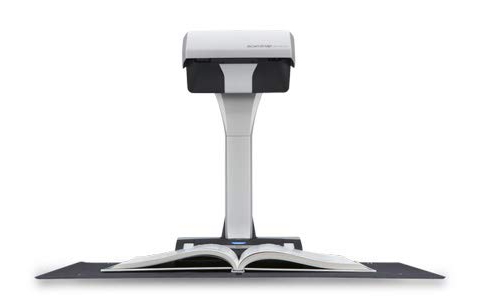

Step 1
Place the book on the mat and press the scan button. The page will scan in under 3 seconds.
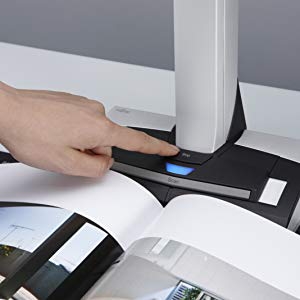
Step 2
Turn the page and allow the scanner automatically continue scanning. The page detection feature allows the user to scan continuously without having to hit the scan button each time.
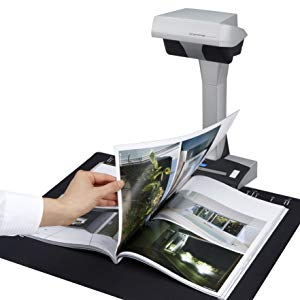
Step 3
Once all of the pages are scanned, you can make necessary edits within the advanced image correction software. This tool allows you to flatten curve distortions from the book's spine, remove scanned fingers, and straighten and crop all images.

Advanced Image Correction
The SV600 comes equipped with advanced image correction software to help you:
- Flatten curve distortions of scanned books and other bound documents
- Remove fingers captured during the scanning process with a few simple clicks
- Crop and de-skew scanned images
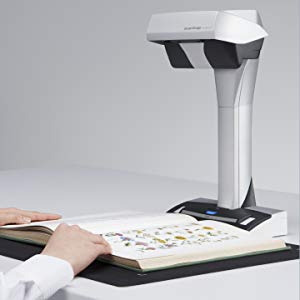
Fujitsu Image Scanner ScanSnap SV600 (FJS-SV600)
Specs
- Scanner Type: Overhead, Simplex
- Scanning Modes: Color, Grayscale, Monochrome, Automatic (Color / Grayscale / Monochrome detection)
- Image Sensor: Lens reduction optics / Color CCD x 1
- Light Source: (White LED + Lens illumination) x 2
- Optical Resolution: 285 to 218 dpi (Horizontal scanning), 283 to 152 dpi (Vertical scanning)Auto Mode
- Document Size: Maximum: 432 x 300 mm (17.0 x 11.8 in.) , Minimum: 25.4 x 25.4mm (1 x 1 in.)(4)
- Document Thickness: 30 mm (1.18 in.) or less
- How to Start Scanning(5): Normal scan: Press "Scan" button for every page, Timed interval scan (Timed Mode) , Page Turning Detection
- Interface: USB 2.0 / USB 1.1 (Connector Type: Type-B)
- Image Processing Function: Deskew by text on document, Auto paper size detection, Auto image rotation, Auto color detection, Book image correction(7), Multiple document detection
- Magnification in Vertical Scanning (length): 1.5 %
- Power Requirement AC 100 to 240 V, 50 / 60 Hz
- Dimensions (W x D x H): 210 x 156 x 383 mm (8.27 x 6.14 x 15.08 in.)
- Device Weight: 3 kg
- Environmental compliance: ENERGY STAR / RoHS
Scanning Speed (A3 landscape)
- Normal Mode: 3 seconds / page (Color / Grayscale: 150 dpi, Monochrome: 300 dpi)
- Better Mode: 3 seconds / page (Color / Grayscale: 200 dpi, Monochrome: 400 dpi)
- Best Mode: 3 seconds / page (Color / Grayscale: 300 dpi, Monochrome: 600 dpi)
- Excellent Mode: 3 seconds / page (Color / Grayscale: 600 dpi, Monochrome: 1,200 dpi)
Power Consumption
- Operating Mode: 20 W or less
- Sleep Mode: 2.6 W or less
- Auto Standby (Off) Mode: 0.4 W or less
Operation Environment
- Temperature: 5 to 35 C (41 to 95 F)
- Relative Humidity: 20 to 80 % (Non-condensing)
Driver
- ScanSnap specific driver: Windows: Does not support TWAIN/ISIS, Mac OS: Does not support TWAIN
Product review
0/5
0 Reviews
